Hexo


  • 首页

  • 归档

  • 标签

RecyclerView 缓存机制

发表于 2021-04-25 | | 阅读次数

RecyclerView 缓存机制

RecyclerView 的缓存机制为 4 级缓存,缓存的内容为 ViewHolder,而不是 View 本身. Recycler 类为缓存相关的类:

1
2
3
4
5
6
7
8
9
10
11
12
13
14
15
16
17
public final class Recycler {
final ArrayList<RecyclerView.ViewHolder> mAttachedScrap = new ArrayList();
ArrayList<RecyclerView.ViewHolder> mChangedScrap = null;
final ArrayList<RecyclerView.ViewHolder> mCachedViews = new ArrayList();
private final List<RecyclerView.ViewHolder> mUnmodifiableAttachedScrap;
private int mRequestedCacheMax;
int mViewCacheMax;
RecyclerView.RecycledViewPool mRecyclerPool;
private RecyclerView.ViewCacheExtension mViewCacheExtension;
static final int DEFAULT_CACHE_SIZE = 2;
public Recycler() {
this.mUnmodifiableAttachedScrap = Collections.unmodifiableList(this.mAttachedScrap);// 5643 5644
this.mRequestedCacheMax = 2;// 5646
this.mViewCacheMax = 2;// 5647
}
}

缓存可分为:

一级缓存 Scrap

屏幕内的缓存。包含 mAttachedScrap 和 mChangedScrap。它们是 RecyclerView 内部控制的缓存,本例暂时忽略

二级缓存 Cache

mCachedViews:缓存ViewHolder,类型为 ArrayList。刚刚滑出屏幕 ViewHolder 的缓存。默认容量为 2

三级缓存 ViewCacheExtension

自定义的缓存,很少会用到,暂时忽略

四级缓存 RecycledViewPool

ViewHolder 缓存池。当二级缓存容量超过 2 时,按照先进先出的原则,Cache 中的 ViewHolder 会保存到 RecycledViewPool 中。

整体流程如下:

Recycler首先去二级缓存(Cache)里面查找是否命中,如果命中直接返回。如果二级缓存没有找到,则去四级缓存查找,如果四级缓存找到了则调用 Adapter.bindViewHolder 来绑定内容,然后返回。如果四级缓存没有找到,那么就通过 Adapter.createViewHolder 创建一个 ViewHolder,然后调用 Adapter.bindViewHolder 绑定其内容,然后返回为 Recycler。

流程图可参考(来源网络,侵删):

来源网络,侵删

参考文章:

https://juejin.cn/post/6844903661726859271

CopyOnWriteArrayList 详解

发表于 2021-04-24 | | 阅读次数

CopyOnWriteArrayList 详解

介绍 CopyOnWriteArrayList 之前,先看一下 ArrayList 的使用:

1
2
3
4
5
6
7
8
9
10
11
public static void main(String... args) {
List<String> list = new ArrayList<>();
list.add("1");
list.add("2");
list.add("3");
for (String s:list){
if ("3".equals(s)){
list.remove(s);
}
}
}

执行上面的代码后 jvm 会抛出 ConcurrentModificationException 的异常:

Exception in thread “main” java.util.ConcurrentModificationException
at java.util.ArrayList$Itr.checkForComodification(ArrayList.java:909)
at java.util.ArrayList$Itr.next(ArrayList.java:859)
at com.example.lib.MyClass.main(MyClass.java:13)

根据报错的堆栈信息可知,异常是在 ArrayList 内部类 Itr 的 checkForComodification 方法抛出的。

反编译 java 代码后,字节码代码如下:

1
2
3
4
5
6
7
8
9
10
11
12
13
14
15
public static void main(String... args) {
List<String> list = new ArrayList();// 9
list.add("1");// 10
list.add("2");// 11
list.add("3");// 12
Iterator var2 = list.iterator();// 13
while(var2.hasNext()) {
String s = (String)var2.next();
if ("3".equals(s)) {// 14
list.remove(s);// 15
}
}
}// 18

由字节码可知,foreach 语法糖实际上是利用了迭代器来完成遍历。

先调用 iterator 方法得到迭代器对象

1
2
3
public Iterator<E> iterator() {
return new Itr();
}

该方法返回的是 ArrayList 的内部类 Itr 对象。Itr 类代码如下:

1
2
3
4
5
6
7
8
9
10
11
12
13
14
15
16
17
18
19
20
21
22
23
24
25
26
27
28
29
30
31
32
33
34
35
36
37
38
39
40
41
42
43
44
private class Itr implements Iterator<E> {
int cursor; // index of next element to return
int lastRet = -1; // index of last element returned; -1 if no such
int expectedModCount = modCount;
Itr() {}
public boolean hasNext() {
return cursor != size;
}
@SuppressWarnings("unchecked")
public E next() {
checkForComodification();
int i = cursor;
if (i >= size)
throw new NoSuchElementException();
Object[] elementData = ArrayList.this.elementData;
if (i >= elementData.length)
throw new ConcurrentModificationException();
cursor = i + 1;
return (E) elementData[lastRet = i];
}
public void remove() {
if (lastRet < 0)
throw new IllegalStateException();
checkForComodification();
try {
ArrayList.this.remove(lastRet);
cursor = lastRet;
lastRet = -1;
expectedModCount = modCount;
} catch (IndexOutOfBoundsException ex) {
throw new ConcurrentModificationException();
}
}
final void checkForComodification() {
if (modCount != expectedModCount)
throw new ConcurrentModificationException();
}
}

next() 方法会先调用 checkForComodification 方法判断 modCount 与 expectedModCount 是否相等,如果不等的话就抛出异常。

对于 expectedModCount ,当创建 Itr 对象的时候会默认赋值为 modCount。当新增或者删除元素的时候会执行 modCount++ ,所以ArrayList 遍历的时候是不允许新增或者删除元素的,那就无法支持多线程的读写操作了。

java 的并发包 java.util.concurrent 里提供的 CopyOnWriteArrayList 是线程安全的,支持多线程并发读写操作。下面以 JDK1.8 源码分析一下实现原理:

1
2
3
4
5
6
7
8
9
10
11
12
13
14
public boolean add(E e) {
final ReentrantLock lock = this.lock;
lock.lock();
try {
Object[] elements = getArray();
int len = elements.length;
Object[] newElements = Arrays.copyOf(elements, len + 1);
newElements[len] = e;
setArray(newElements);
return true;
} finally {
lock.unlock();
}
}
1
2
3
4
5
6
7
8
9
10
11
12
13
14
15
16
17
18
19
20
21
22
public E remove(int index) {
final ReentrantLock lock = this.lock;
lock.lock();
try {
Object[] elements = getArray();
int len = elements.length;
E oldValue = get(elements, index);
int numMoved = len - index - 1;
if (numMoved == 0)
setArray(Arrays.copyOf(elements, len - 1));
else {
Object[] newElements = new Object[len - 1];
System.arraycopy(elements, 0, newElements, 0, index);
System.arraycopy(elements, index + 1, newElements, index,
numMoved);
setArray(newElements);
}
return oldValue;
} finally {
lock.unlock();
}
}
1
2
3
4
5
6
7
8
9
public E get(int index) {
return get(getArray(), index);
}
private E get(Object[] a, int index) {
return (E) a[index];
}
final Object[] getArray() {
return array;
}

由源码可知,CopyOnWriteArrayList 在新增或者删除元素,先获取可重入锁 ReentrantLock,拷贝原来的数组,在新的数组上面新增或者删除元素。CopyOnWriteArrayList 在读取元素的时候,直接在老数组上读取。CopyOnWriteArrayList 的读写操作是在不同的数组上面操作的,保证了多线程操作的安全性。

LinkedBlockingQueue 详解

发表于 2021-04-24 | | 阅读次数

LinkedBlockingQueue 详解

LinkedBlockingQueue 是 Java 并发包 java.util.concurrent 提供的一个集合类。

LinkedBlockingQueue 提供了 add()、put()、offer() 方法来添加元素,提供了 peek()、take()、poll() 方法来获取队首元素。

往队列中添加元素

offer 方法源码如下:

1
2
3
4
5
6
7
8
9
10
11
12
13
14
15
16
17
18
19
20
21
22
23
24
25
26
27
public boolean offer(E e) {
if (e == null) throw new NullPointerException();
final AtomicInteger count = this.count;
//如果已达容量上限,则返回false
if (count.get() == capacity)
return false;
int c = -1;
Node<E> node = new Node<E>(e);
final ReentrantLock putLock = this.putLock;
//获取互斥锁
putLock.lock();
try {
if (count.get() < capacity) {
//将元素加入队尾
enqueue(node);
c = count.getAndIncrement();
if (c + 1 < capacity)
//如果元素数量未达上限,唤醒调用 notFull.await() 方法的线程
notFull.signal();
}
} finally {
putLock.unlock();
}
if (c == 0)
signalNotEmpty();
return c >= 0;
}

add 方法源码如下:

1
2
3
4
5
6
public boolean add(E e) {
if (offer(e))
return true;
else
throw new IllegalStateException("Queue full");
}

add 方法简单地调用了 offer 方法,区别在于当添加元素失败的时候会抛出异常。

接着看一下 put 方法:

1
2
3
4
5
6
7
8
9
10
11
12
13
14
15
16
17
18
19
20
21
22
23
public void put(E e) throws InterruptedException {
if (e == null) throw new NullPointerException();
int c = -1;
Node<E> node = new Node<E>(e);
final ReentrantLock putLock = this.putLock;
final AtomicInteger count = this.count;
putLock.lockInterruptibly();
try {
// 当元素数量已满,暂停当前线程、释放 putLock 锁
while (count.get() == capacity) {
notFull.await();
}
//元素入队
enqueue(node);
c = count.getAndIncrement();
if (c + 1 < capacity)
notFull.signal();
} finally {
putLock.unlock();
}
if (c == 0)
signalNotEmpty();
}

add()、put()、offer() 方法都可以添加元素,区别在于对于队列数量已满情况下的处理,当队列元素已满时,offer 方法会返回 false、ad d 方法会抛出异常、而 put 方法会暂停当前线程直至有空闲空间。

从队列中取元素

下面看一下 peek 的源码:

1
2
3
4
5
6
7
8
9
10
11
12
13
14
15
16
public E peek() {
if (count.get() == 0)
return null;
final ReentrantLock takeLock = this.takeLock;
takeLock.lock();
try {
Node<E> first = head.next;
if (first == null)
//当队首为空的时候返回 null
return null;
else
return first.item;
} finally {
takeLock.unlock();
}
}

由源码可知,peek 方法只是返回队首元素的值,队首元素并未出队。

poll 方法源码:

1
2
3
4
5
6
7
8
9
10
11
12
13
14
15
16
17
18
19
20
21
22
23
24
public E poll() {
final AtomicInteger count = this.count;
if (count.get() == 0)
return null;
E x = null;
int c = -1;
final ReentrantLock takeLock = this.takeLock;
takeLock.lock();
try {
if (count.get() > 0) {
//当集合元素个数大于 0 的时候,队首元素出队列
x = dequeue();
c = count.getAndDecrement();
//唤醒调用 notEmpty.await 的线程
if (c > 1)
notEmpty.signal();
}
} finally {
takeLock.unlock();
}
if (c == capacity)
signalNotFull();
return x;
}

最后看一下 take 方法的源码:

1
2
3
4
5
6
7
8
9
10
11
12
13
14
15
16
17
18
19
20
21
22
23
public E take() throws InterruptedException {
E x;
int c = -1;
final AtomicInteger count = this.count;
final ReentrantLock takeLock = this.takeLock;
takeLock.lockInterruptibly();
try {
// 当集合为空的时候,暂停当前线程使当前线程处于等待状态
while (count.get() == 0) {
notEmpty.await();
}
//出队列
x = dequeue();
c = count.getAndDecrement();
if (c > 1)
notEmpty.signal();
} finally {
takeLock.unlock();
}
if (c == capacity)
signalNotFull();
return x;
}

peek()、take()、poll() 方法都可以获取队首元素,区别在于当队列元素数量为空的时候,peek() 和 poll() 方法会返回 null, 而 take() 方法会暂停当前线程直至队列中存在新的元素。还有一点,peek 方法只是返回队首元素的值,队首元素并不会出队。

Tinker 源码解析

发表于 2021-04-23 | | 阅读次数

Tinker 源码解析

Tinker 的官方介绍:

Tinker是微信官方的Android热补丁解决方案,它支持动态下发代码、So库以及资源,让应用能够在不需要重新安装的情况下实现更新.

tinker 加载补丁

从应用启动开始分析,TinkerApplication 的 onBaseContextAttached() -> loadTinker() -> TinkerLoader 类的 tryLoad() -> tryLoadPatchFilesInternal() 方法:

1
2
3
4
5
6
7
8
9
10
11
12
13
14
15
16
17
18
19
20
21
22
23
24
25
26
27
28
29
30
31
32
33
34
35
36
37
38
39
40
41
42
43
44
45
46
47
48
49
50
51
52
53
54
55
56
57
58
59
60
61
62
63
64
65
66
67
68
69
70
71
72
73
74
75
76
77
78
79
80
81
82
83
84
85
86
87
88
89
90
91
92
93
94
95
96
97
98
99
100
101
102
103
104
105
106
107
108
109
110
111
112
113
114
115
116
117
118
119
120
121
122
123
124
125
126
127
128
129
130
131
132
133
134
135
136
137
138
139
140
141
142
143
144
145
146
147
148
149
150
151
152
153
154
155
156
157
158
159
160
161
162
163
164
165
166
167
168
169
170
171
172
173
174
175
176
177
178
179
180
181
182
183
184
185
186
187
188
189
190
191
192
193
194
195
196
197
198
199
200
201
202
203
204
private void tryLoadPatchFilesInternal(TinkerApplication app, Intent resultIntent) {
final int tinkerFlag = app.getTinkerFlags();
//确保开启tinker、当前进程不是 :patch 进程
if (!ShareTinkerInternals.isTinkerEnabled(tinkerFlag)) {
...
return;
}
if (ShareTinkerInternals.isInPatchProcess(app)) {
...
return;
}
//检查tinker目录是否存在(data/data/包名/tinker)
//tinker
File patchDirectoryFile = SharePatchFileUtil.getPatchDirectory(app);
if (patchDirectoryFile == null) {
...
return;
}
String patchDirectoryPath = patchDirectoryFile.getAbsolutePath();
//tinker/patch.info 补丁信息文件
File patchInfoFile = SharePatchFileUtil.getPatchInfoFile(patchDirectoryPath);
//check patch info file whether exist
if (!patchInfoFile.exists()) {
....
return;
}
//获取patch.info并包装为SharePatchInfo
//old = 641e634c5b8f1649c75caf73794acbdf
//new = 2c150d8560334966952678930ba67fa8
File patchInfoLockFile = SharePatchFileUtil.getPatchInfoLockFile(patchDirectoryPath);
patchInfo = SharePatchInfo.readAndCheckPropertyWithLock(patchInfoFile, patchInfoLockFile);
if (patchInfo == null) {
ShareIntentUtil.setIntentReturnCode(resultIntent, ShareConstants.ERROR_LOAD_PATCH_INFO_CORRUPTED);
return;
}
final boolean isProtectedApp = patchInfo.isProtectedApp;
resultIntent.putExtra(ShareIntentUtil.INTENT_IS_PROTECTED_APP, isProtectedApp);
String oldVersion = patchInfo.oldVersion;
String newVersion = patchInfo.newVersion;
String oatDex = patchInfo.oatDir;
if (oldVersion == null || newVersion == null || oatDex == null) {
//it is nice to clean patch
ShareTinkerLog.w(TAG, "tryLoadPatchFiles:onPatchInfoCorrupted");
ShareIntentUtil.setIntentReturnCode(resultIntent, ShareConstants.ERROR_LOAD_PATCH_INFO_CORRUPTED);
return;
}
//是否删除新的patch
boolean mainProcess = ShareTinkerInternals.isInMainProcess(app);
boolean isRemoveNewVersion = patchInfo.isRemoveNewVersion;
if (mainProcess) {
final String patchName = SharePatchFileUtil.getPatchVersionDirectory(newVersion);
// So far new version is not loaded in main process and other processes.
// We can remove new version directory safely.
if (isRemoveNewVersion) {
ShareTinkerLog.w(TAG, "found clean patch mark and we are in main process, delete patch file now.");
if (patchName != null) {
// oldVersion.equals(newVersion) means the new version has been loaded at least once
// after it was applied.
final boolean isNewVersionLoadedBefore = oldVersion.equals(newVersion);
if (isNewVersionLoadedBefore) {
// Set oldVersion and newVersion to empty string to clean patch
// if current patch has been loaded before.
oldVersion = "";
}
newVersion = oldVersion;
patchInfo.oldVersion = oldVersion;
patchInfo.newVersion = newVersion;
patchInfo.isRemoveNewVersion = false;
SharePatchInfo.rewritePatchInfoFileWithLock(patchInfoFile, patchInfo, patchInfoLockFile);
String patchVersionDirFullPath = patchDirectoryPath + "/" + patchName;
SharePatchFileUtil.deleteDir(patchVersionDirFullPath);
if (isNewVersionLoadedBefore) {
ShareTinkerInternals.killProcessExceptMain(app);
ShareIntentUtil.setIntentReturnCode(resultIntent, ShareConstants.ERROR_LOAD_PATCH_DIRECTORY_NOT_EXIST);
return;
}
}
}
}
resultIntent.putExtra(ShareIntentUtil.INTENT_PATCH_OLD_VERSION, oldVersion);
resultIntent.putExtra(ShareIntentUtil.INTENT_PATCH_NEW_VERSION, newVersion);
boolean versionChanged = !(oldVersion.equals(newVersion));
boolean oatModeChanged = oatDex.equals(ShareConstants.CHANING_DEX_OPTIMIZE_PATH);
oatDex = ShareTinkerInternals.getCurrentOatMode(app, oatDex);
resultIntent.putExtra(ShareIntentUtil.INTENT_PATCH_OAT_DIR, oatDex);
//根据版本变化和是否是主进程的条件决定是否加载新patch
String version = oldVersion;
if (versionChanged && mainProcess) {
version = newVersion;
}
if (ShareTinkerInternals.isNullOrNil(version)) {
ShareTinkerLog.w(TAG, "tryLoadPatchFiles:version is blank, wait main process to restart");
ShareIntentUtil.setIntentReturnCode(resultIntent, ShareConstants.ERROR_LOAD_PATCH_INFO_BLANK);
return;
}
//patch-641e634c
String patchName = SharePatchFileUtil.getPatchVersionDirectory(version);
if (patchName == null) {
ShareTinkerLog.w(TAG, "tryLoadPatchFiles:patchName is null");
//we may delete patch info file
ShareIntentUtil.setIntentReturnCode(resultIntent, ShareConstants.ERROR_LOAD_PATCH_VERSION_DIRECTORY_NOT_EXIST);
return;
}
//tinker/patch.info/patch-641e634c
String patchVersionDirectory = patchDirectoryPath + "/" + patchName;
File patchVersionDirectoryFile = new File(patchVersionDirectory);
if (!patchVersionDirectoryFile.exists()) {
ShareTinkerLog.w(TAG, "tryLoadPatchFiles:onPatchVersionDirectoryNotFound");
//we may delete patch info file
ShareIntentUtil.setIntentReturnCode(resultIntent, ShareConstants.ERROR_LOAD_PATCH_VERSION_DIRECTORY_NOT_EXIST);
return;
}
//tinker/patch.info/patch-641e634c/patch-641e634c.apk
final String patchVersionFileRelPath = SharePatchFileUtil.getPatchVersionFile(version);
File patchVersionFile = (patchVersionFileRelPath != null ? new File(patchVersionDirectoryFile.getAbsolutePath(), patchVersionFileRelPath) : null);
if (!SharePatchFileUtil.isLegalFile(patchVersionFile)) {
ShareTinkerLog.w(TAG, "tryLoadPatchFiles:onPatchVersionFileNotFound");
//we may delete patch info file
ShareIntentUtil.setIntentReturnCode(resultIntent, ShareConstants.ERROR_LOAD_PATCH_VERSION_FILE_NOT_EXIST);
return;
}
ShareSecurityCheck securityCheck = new ShareSecurityCheck(app);
//校验签名及 TinkerId
int returnCode = ShareTinkerInternals.checkTinkerPackage(app, tinkerFlag, patchVersionFile, securityCheck);
if (returnCode != ShareConstants.ERROR_PACKAGE_CHECK_OK) {
ShareTinkerLog.w(TAG, "tryLoadPatchFiles:checkTinkerPackage");
resultIntent.putExtra(ShareIntentUtil.INTENT_PATCH_PACKAGE_PATCH_CHECK, returnCode);
ShareIntentUtil.setIntentReturnCode(resultIntent, ShareConstants.ERROR_LOAD_PATCH_PACKAGE_CHECK_FAIL);
return;
}
//调用 checkComplete 方法校验资源、so库、dex的文件是否完整
...
// 加载dex补丁。
//now we can load patch jar
if (!isArkHotRuning && isEnabledForDex) {
boolean loadTinkerJars = TinkerDexLoader.loadTinkerJars(app, patchVersionDirectory, oatDex, resultIntent, isSystemOTA, isProtectedApp);
if (isSystemOTA) {
// update fingerprint after load success
patchInfo.fingerPrint = Build.FINGERPRINT;
patchInfo.oatDir = loadTinkerJars ? ShareConstants.INTERPRET_DEX_OPTIMIZE_PATH : ShareConstants.DEFAULT_DEX_OPTIMIZE_PATH;
// reset to false
oatModeChanged = false;
if (!SharePatchInfo.rewritePatchInfoFileWithLock(patchInfoFile, patchInfo, patchInfoLockFile)) {
ShareIntentUtil.setIntentReturnCode(resultIntent, ShareConstants.ERROR_LOAD_PATCH_REWRITE_PATCH_INFO_FAIL);
ShareTinkerLog.w(TAG, "tryLoadPatchFiles:onReWritePatchInfoCorrupted");
return;
}
// update oat dir
resultIntent.putExtra(ShareIntentUtil.INTENT_PATCH_OAT_DIR, patchInfo.oatDir);
}
if (!loadTinkerJars) {
ShareTinkerLog.w(TAG, "tryLoadPatchFiles:onPatchLoadDexesFail");
return;
}
}
if (isArkHotRuning && isEnabledForArkHot) {
boolean loadArkHotFixJars = TinkerArkHotLoader.loadTinkerArkHot(app, patchVersionDirectory, resultIntent);
if (!loadArkHotFixJars) {
ShareTinkerLog.w(TAG, "tryLoadPatchFiles:onPatchLoadArkApkFail");
return;
}
}
// 加载资源补丁
//now we can load patch resource
if (isEnabledForResource) {
boolean loadTinkerResources = TinkerResourceLoader.loadTinkerResources(app, patchVersionDirectory, resultIntent);
if (!loadTinkerResources) {
ShareTinkerLog.w(TAG, "tryLoadPatchFiles:onPatchLoadResourcesFail");
return;
}
}
...
//all is ok!
ShareIntentUtil.setIntentReturnCode(resultIntent, ShareConstants.ERROR_LOAD_OK);
ShareTinkerLog.i(TAG, "tryLoadPatchFiles: load end, ok!");
}

简单总结这个长方法的工作:

  1. 一系列检查: tinker是否开启、tinker文件夹是否存在、patch.info文件是否存在

  2. 通过patch.info校验patch有效性,决定是否加载patch

  3. 补丁包校验:校验签名、tinkerId是否与基准包一致
  4. 加载dex、resource补丁

另外,要强调的是:tinker文件夹是在执行合成的时候生成的。

tinker 合成补丁

用户主动调用 onReceiveUpgradePatch 方法,传入补丁路径:

1
2
3
4
5
6
7
8
9
/**
* new patch file to install, try install them with :patch process
*
* @param context
* @param patchLocation 补丁路径
*/
public static void onReceiveUpgradePatch(Context context, String patchLocation) {
Tinker.with(context).getPatchListener().onPatchReceived(patchLocation);
}

DefaultPatchListener.java:

1
2
3
4
5
6
7
8
9
10
11
12
13
public int onPatchReceived(String path) {
final File patchFile = new File(path);
final String patchMD5 = SharePatchFileUtil.getMD5(patchFile);
final int returnCode = patchCheck(path, patchMD5);
if (returnCode == ShareConstants.ERROR_PATCH_OK) {
//校验成功则开启服务合并差分包
runForgService();
TinkerPatchService.runPatchService(context, path);
} else {
Tinker.with(context).getLoadReporter().onLoadPatchListenerReceiveFail(new File(path), returnCode);
}
return returnCode;
}

看一下 TinkerPatchService 类:

1
2
3
4
5
6
7
8
9
10
11
12
13
14
15
16
17
public static void runPatchService(final Context context, final String path) {
ShareTinkerLog.i(TAG, "run patch service...");
Intent intent = new Intent(context, TinkerPatchService.class);
intent.putExtra(PATCH_PATH_EXTRA, path);
intent.putExtra(RESULT_CLASS_EXTRA, resultServiceClass.getName());
try {
context.startService(intent);
} catch (Throwable thr) {
ShareTinkerLog.e(TAG, "run patch service fail, exception:" + thr);
}
}
@Override
protected void onHandleIntent(Intent intent) {
increasingPriority();
doApplyPatch(this, intent);
}

doApplyPatch 方法调用了 UpgradePatch 的 tryPatch 方法:

1
2
3
4
5
6
7
8
9
10
11
12
13
14
15
16
17
18
19
20
21
22
23
24
25
26
27
28
29
30
31
32
33
34
35
36
37
38
39
40
41
42
43
44
45
46
47
48
49
50
51
52
53
54
55
56
57
58
59
60
61
62
63
64
65
66
public boolean tryPatch(Context context, String tempPatchPath, PatchResult patchResult) {
Tinker manager = Tinker.with(context);
final File patchFile = new File(tempPatchPath);
//一系列校验
//copy file
File destPatchFile = new File(patchVersionDirectory + "/" + SharePatchFileUtil.getPatchVersionFile(patchMd5));
try {
// check md5 first
if (!patchMd5.equals(SharePatchFileUtil.getMD5(destPatchFile))) {
SharePatchFileUtil.copyFileUsingStream(patchFile, destPatchFile);
ShareTinkerLog.w(TAG, "UpgradePatch copy patch file, src file: %s size: %d, dest file: %s size:%d", patchFile.getAbsolutePath(), patchFile.length(),
destPatchFile.getAbsolutePath(), destPatchFile.length());
}
} catch (IOException e) {
ShareTinkerLog.e(TAG, "UpgradePatch tryPatch:copy patch file fail from %s to %s", patchFile.getPath(), destPatchFile.getPath());
manager.getPatchReporter().onPatchTypeExtractFail(patchFile, destPatchFile, patchFile.getName(), ShareConstants.TYPE_PATCH_FILE);
return false;
}
//合并dex文件
//we use destPatchFile instead of patchFile, because patchFile may be deleted during the patch process
if (!DexDiffPatchInternal.tryRecoverDexFiles(manager, signatureCheck, context, patchVersionDirectory, destPatchFile, patchResult)) {
ShareTinkerLog.e(TAG, "UpgradePatch tryPatch:new patch recover, try patch dex failed");
return false;
}
if (!ArkHotDiffPatchInternal.tryRecoverArkHotLibrary(manager, signatureCheck,
context, patchVersionDirectory, destPatchFile)) {
return false;
}
//合并so库文件
if (!BsDiffPatchInternal.tryRecoverLibraryFiles(manager, signatureCheck, context, patchVersionDirectory, destPatchFile)) {
ShareTinkerLog.e(TAG, "UpgradePatch tryPatch:new patch recover, try patch library failed");
return false;
}
//合并资源
if (!ResDiffPatchInternal.tryRecoverResourceFiles(manager, signatureCheck, context, patchVersionDirectory, destPatchFile)) {
ShareTinkerLog.e(TAG, "UpgradePatch tryPatch:new patch recover, try patch resource failed");
return false;
}
// check dex opt file at last, some phone such as VIVO/OPPO like to change dex2oat to interpreted
if (!DexDiffPatchInternal.waitAndCheckDexOptFile(patchFile, manager)) {
ShareTinkerLog.e(TAG, "UpgradePatch tryPatch:new patch recover, check dex opt file failed");
return false;
}
if (!SharePatchInfo.rewritePatchInfoFileWithLock(patchInfoFile, newInfo, patchInfoLockFile)) {
ShareTinkerLog.e(TAG, "UpgradePatch tryPatch:new patch recover, rewrite patch info failed");
manager.getPatchReporter().onPatchInfoCorrupted(patchFile, newInfo.oldVersion, newInfo.newVersion);
return false;
}
// Reset patch apply retry count to let us be able to reapply without triggering
// patch apply disable when we apply it successfully previously.
UpgradePatchRetry.getInstance(context).onPatchResetMaxCheck(patchMd5);
ShareTinkerLog.w(TAG, "UpgradePatch tryPatch: done, it is ok");
return true;
}

参考链接:热修复框架 - TinkerApplication启动(一) - 初始化过程

热修复框架 - Tinker patch合成流程

接下来的文章会分别详细介绍资源、dex、so库的拆分、合成与加载。

Tinker dex 代码修复解析

发表于 2021-04-23 | | 阅读次数

Tinker dex 代码修复

Dex 代码的修复方案是 classloader 机制。具体原理是将修复后的 dex 文件插入到 dex 数组的最前面。

加载dex

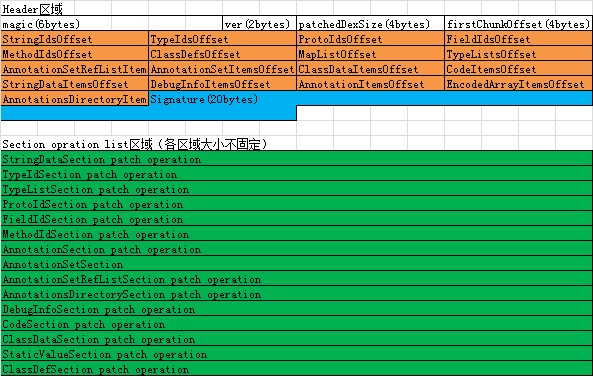
众所周知,Android 工程的 java 代码会被编译打包放在 dex 文件中。dex 结构图如下:

dex结构图

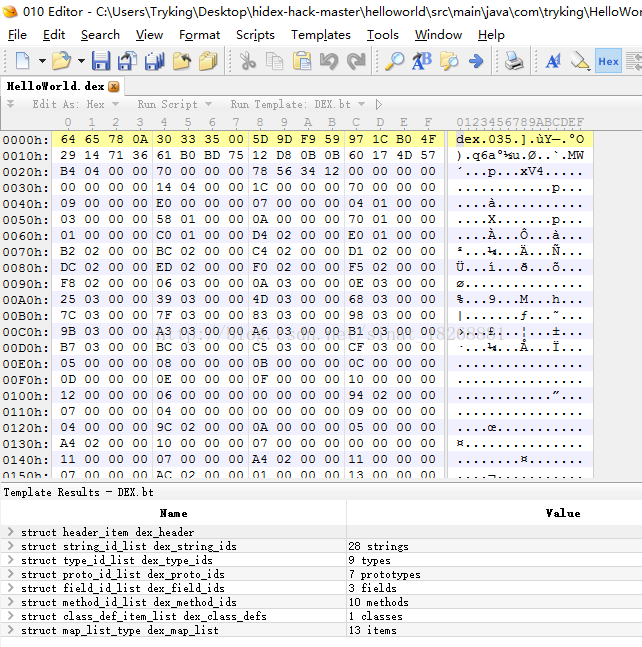
使用 010Editor 程序可以清晰查看 dex 文件:

010查看dex文件

dex 的 diff

dex 文件的差分采用了微信自研的 DexDiff 算法。相比 BsDiff 以文件粒度进行差分,DexDiff 算法深度利用Dex的格式来减少差异的大小,粒度更小。

dex 差分的入口是在 DexPatchGenerator 类。

1
2
3
4
// 构造函数传入了新 dex 文件和老 dex 文件,Dex 的构造函数会将文件解析转换为 Dex 对象
public DexPatchGenerator(File oldDexFile, File newDexFile) throws IOException {
this(new Dex(oldDexFile), new Dex(newDexFile));
}

executeAndSaveTo 用来生成差分包。它对 dex 各区域的数据分别进行差分:

1
2
3
4
5
6
7
8
9
10
11
12
13
14
15
16
17
18
19
20
21
22
23
24
25
26
27
28
29
30
31
32
33
34
35
36
37
38
39
40
41
42
43
44
45
46
47
48
49
50
51
52
53
54
55
56
57
58
59
60
61
62
63
64
65
66
67
68
69
70
71
72
73
74
75
76
77
78
79
80
81
82
83
84
85
86
87
88
89
90
91
92
93
94
95
96
97
98
99
100
101
102
103
104
105
106
public void executeAndSaveTo(OutputStream out) throws IOException {
// Firstly, collect information of items we want to remove additionally
// in new dex and set them to corresponding diff algorithm implementations.
Pattern[] classNamePatterns = new Pattern[this.additionalRemovingClassPatternSet.size()];
int classNamePatternCount = 0;
for (String regExStr : this.additionalRemovingClassPatternSet) {
classNamePatterns[classNamePatternCount++] = Pattern.compile(regExStr);
}
List<Integer> typeIdOfClassDefsToRemove = new ArrayList<>(classNamePatternCount);
List<Integer> offsetOfClassDatasToRemove = new ArrayList<>(classNamePatternCount);
for (ClassDef classDef : this.newDex.classDefs()) {
String typeName = this.newDex.typeNames().get(classDef.typeIndex);
for (Pattern pattern : classNamePatterns) {
if (pattern.matcher(typeName).matches()) {
typeIdOfClassDefsToRemove.add(classDef.typeIndex);
offsetOfClassDatasToRemove.add(classDef.classDataOffset);
break;
}
}
}
((ClassDefSectionDiffAlgorithm) this.classDefSectionDiffAlg)
.setTypeIdOfClassDefsToRemove(typeIdOfClassDefsToRemove);
((ClassDataSectionDiffAlgorithm) this.classDataSectionDiffAlg)
.setOffsetOfClassDatasToRemove(offsetOfClassDatasToRemove);
// Then, run diff algorithms according to sections' dependencies.
// Use size calculated by algorithms above or from dex file definition to
// calculate sections' offset and patched dex size.
// Calculate header and id sections size, so that we can work out
// the base offset of typeLists Section.
int patchedheaderSize = SizeOf.HEADER_ITEM;
int patchedStringIdsSize = newDex.getTableOfContents().stringIds.size * SizeOf.STRING_ID_ITEM;
int patchedTypeIdsSize = newDex.getTableOfContents().typeIds.size * SizeOf.TYPE_ID_ITEM;
// Although simulatePatchOperation can calculate this value, since protoIds section
// depends on typeLists section, we can't run protoIds Section's simulatePatchOperation
// method so far. Instead we calculate protoIds section's size using information in newDex
// directly.
int patchedProtoIdsSize = newDex.getTableOfContents().protoIds.size * SizeOf.PROTO_ID_ITEM;
int patchedFieldIdsSize = newDex.getTableOfContents().fieldIds.size * SizeOf.MEMBER_ID_ITEM;
int patchedMethodIdsSize = newDex.getTableOfContents().methodIds.size * SizeOf.MEMBER_ID_ITEM;
int patchedClassDefsSize = newDex.getTableOfContents().classDefs.size * SizeOf.CLASS_DEF_ITEM;
int patchedIdSectionSize =
patchedStringIdsSize
+ patchedTypeIdsSize
+ patchedProtoIdsSize
+ patchedFieldIdsSize
+ patchedMethodIdsSize
+ patchedClassDefsSize;
this.patchedHeaderOffset = 0;
// The diff works on each sections obey such procedure:
// 1. Execute diff algorithms to calculate indices of items we need to add, del and replace.
// 2. Execute patch algorithm simulation to calculate indices and offsets mappings that is
// necessary to next section's diff works.
// Immediately do the patch simulation so that we can know:
// 1. Indices and offsets mapping between old dex and patched dex.
// 2. Indices and offsets mapping between new dex and patched dex.
// These information will be used to do next diff works.
//对字符串区域的差分
this.patchedStringIdsOffset = patchedHeaderOffset + patchedheaderSize;
if (this.oldDex.getTableOfContents().stringIds.isElementFourByteAligned) {
this.patchedStringIdsOffset
= SizeOf.roundToTimesOfFour(this.patchedStringIdsOffset);
}
this.stringDataSectionDiffAlg.execute();
this.patchedStringDataItemsOffset = patchedheaderSize + patchedIdSectionSize;
if (this.oldDex.getTableOfContents().stringDatas.isElementFourByteAligned) {
this.patchedStringDataItemsOffset
= SizeOf.roundToTimesOfFour(this.patchedStringDataItemsOffset);
}
this.stringDataSectionDiffAlg.simulatePatchOperation(this.patchedStringDataItemsOffset);
......
this.classDefSectionDiffAlg.execute();
this.patchedClassDefsOffset = this.patchedMethodIdsOffset + patchedMethodIdsSize;
if (this.oldDex.getTableOfContents().classDefs.isElementFourByteAligned) {
this.patchedClassDefsOffset = SizeOf.roundToTimesOfFour(this.patchedClassDefsOffset);
}
// Calculate any values we still know nothing about them.
this.patchedMapListOffset
= this.patchedEncodedArrayItemsOffset
+ this.encodedArraySectionDiffAlg.getPatchedSectionSize();
if (this.oldDex.getTableOfContents().mapList.isElementFourByteAligned) {
this.patchedMapListOffset = SizeOf.roundToTimesOfFour(this.patchedMapListOffset);
}
int patchedMapListSize = newDex.getTableOfContents().mapList.byteCount;
this.patchedDexSize
= this.patchedMapListOffset
+ patchedMapListSize;
// Finally, write results to patch file.
writeResultToStream(out);
}

差分工作是在 DexSectionDiffAlgorithm.java 中完成的,DexSectionDiffAlgorithm 是个抽象类,它的 execute 方法描述了差分的大致骨架,具体的实现是在各个子类完成的。骨架代码如下:

1
2
3
4
5
6
7
8
9
10
11
12
13
14
15
16
17
18
19
20
21
22
23
24
25
26
27
28
29
30
31
32
33
34
35
36
37
38
39
40
41
42
43
44
45
46
47
48
49
50
51
52
53
54
55
56
57
58
59
60
61
62
63
64
65
66
67
68
69
70
71
72
73
74
75
76
77
78
79
80
81
82
83
84
85
86
87
88
89
90
91
92
93
94
95
96
97
98
99
100
101
102
103
104
105
106
107
108
109
110
111
112
113
114
115
116
117
118
119
120
public void execute() {
this.patchOperationList.clear();
//收集新老 dex 里的数据项、进行排序操作
this.adjustedOldIndexedItemsWithOrigOrder = collectSectionItems(this.oldDex, true);
this.oldItemCount = this.adjustedOldIndexedItemsWithOrigOrder.length;
AbstractMap.SimpleEntry<Integer, T>[] adjustedOldIndexedItems = new AbstractMap.SimpleEntry[this.oldItemCount];
System.arraycopy(this.adjustedOldIndexedItemsWithOrigOrder, 0, adjustedOldIndexedItems, 0, this.oldItemCount);
Arrays.sort(adjustedOldIndexedItems, this.comparatorForItemDiff);
AbstractMap.SimpleEntry<Integer, T>[] adjustedNewIndexedItems = collectSectionItems(this.newDex, false);
this.newItemCount = adjustedNewIndexedItems.length;
Arrays.sort(adjustedNewIndexedItems, this.comparatorForItemDiff);
//使用两个指针遍历新老元素,将新增元素、删除的元素保存到 patchOperationList
int oldCursor = 0;
int newCursor = 0;
while (oldCursor < this.oldItemCount || newCursor < this.newItemCount) {
if (oldCursor >= this.oldItemCount) {
// rest item are all newItem.
while (newCursor < this.newItemCount) {
AbstractMap.SimpleEntry<Integer, T> newIndexedItem = adjustedNewIndexedItems[newCursor++];
this.patchOperationList.add(new PatchOperation<>(PatchOperation.OP_ADD, newIndexedItem.getKey(), newIndexedItem.getValue()));
}
} elseu a
if (newCursor >= newItemCount) {
// rest item are all oldItem.
while (oldCursor < oldItemCount) {
AbstractMap.SimpleEntry<Integer, T> oldIndexedItem = adjustedOldIndexedItems[oldCursor++];
int deletedIndex = oldIndexedItem.getKey();
int deletedOffset = getItemOffsetOrIndex(deletedIndex, oldIndexedItem.getValue());
this.patchOperationList.add(new PatchOperation<T>(PatchOperation.OP_DEL, deletedIndex));
markDeletedIndexOrOffset(this.oldToPatchedIndexMap, deletedIndex, deletedOffset);
}
} else {
AbstractMap.SimpleEntry<Integer, T> oldIndexedItem = adjustedOldIndexedItems[oldCursor];
AbstractMap.SimpleEntry<Integer, T> newIndexedItem = adjustedNewIndexedItems[newCursor];
int cmpRes = oldIndexedItem.getValue().compareTo(newIndexedItem.getValue());
if (cmpRes < 0) {
int deletedIndex = oldIndexedItem.getKey();
int deletedOffset = getItemOffsetOrIndex(deletedIndex, oldIndexedItem.getValue());
this.patchOperationList.add(new PatchOperation<T>(PatchOperation.OP_DEL, deletedIndex));
markDeletedIndexOrOffset(this.oldToPatchedIndexMap, deletedIndex, deletedOffset);
++oldCursor;
} else
if (cmpRes > 0) {
this.patchOperationList.add(new PatchOperation<>(PatchOperation.OP_ADD, newIndexedItem.getKey(), newIndexedItem.getValue()));
++newCursor;
} else {
int oldIndex = oldIndexedItem.getKey();
int newIndex = newIndexedItem.getKey();
int oldOffset = getItemOffsetOrIndex(oldIndexedItem.getKey(), oldIndexedItem.getValue());
int newOffset = getItemOffsetOrIndex(newIndexedItem.getKey(), newIndexedItem.getValue());
if (oldIndex != newIndex) {
this.oldIndexToNewIndexMap.put(oldIndex, newIndex);
}
if (oldOffset != newOffset) {
this.oldOffsetToNewOffsetMap.put(oldOffset, newOffset);
}
++oldCursor;
++newCursor;
}
}
}
// So far all diff works are done. Then we perform some optimize works.
// detail: {OP_DEL idx} followed by {OP_ADD the_same_idx newItem}
// will be replaced by {OP_REPLACE idx newItem}
Collections.sort(this.patchOperationList, comparatorForPatchOperationOpt);
//针对 index 相同的 OP_DEL 和 OP_ADD 操作,将其转换为 OP_REPLACE
Iterator<PatchOperation<T>> patchOperationIt = this.patchOperationList.iterator();
PatchOperation<T> prevPatchOperation = null;
while (patchOperationIt.hasNext()) {
PatchOperation<T> patchOperation = patchOperationIt.next();
if (prevPatchOperation != null
&& prevPatchOperation.op == PatchOperation.OP_DEL
&& patchOperation.op == PatchOperation.OP_ADD
) {
if (prevPatchOperation.index == patchOperation.index) {
prevPatchOperation.op = PatchOperation.OP_REPLACE;
prevPatchOperation.newItem = patchOperation.newItem;
patchOperationIt.remove();
prevPatchOperation = null;
} else {
prevPatchOperation = patchOperation;
}
} else {
prevPatchOperation = patchOperation;
}
}
// Finally we record some information for the final calculations.
//把增加元素、删除元素、修改元素的操作分别存放到三个集合中
patchOperationIt = this.patchOperationList.iterator();
while (patchOperationIt.hasNext()) {
PatchOperation<T> patchOperation = patchOperationIt.next();
switch (patchOperation.op) {
case PatchOperation.OP_DEL: {
indexToDelOperationMap.put(patchOperation.index, patchOperation);
break;
}
case PatchOperation.OP_ADD: {
indexToAddOperationMap.put(patchOperation.index, patchOperation);
break;
}
case PatchOperation.OP_REPLACE: {
indexToReplaceOperationMap.put(patchOperation.index, patchOperation);
break;
}
default: {
break;
}
}
}
}

最后调用 DexPatchGenerator.java 的 writePatchOperations 方法将 patch 信息写入差分包文件中:

1
2
3
4
5
6
7
8
9
10
11
12
13
14
15
16
17
18
19
20
21
22
23
24
25
26
27
28
29
30
31
32
33
34
35
36
37
38
39
40
41
42
43
44
45
46
47
48
49
50
51
52
53
54
55
56
57
58
59
60
61
private <T extends Comparable<T>> void writePatchOperations(
DexDataBuffer buffer, List<PatchOperation<T>> patchOperationList
) {
List<Integer> delOpIndexList = new ArrayList<>(patchOperationList.size());
List<Integer> addOpIndexList = new ArrayList<>(patchOperationList.size());
List<Integer> replaceOpIndexList = new ArrayList<>(patchOperationList.size());
List<T> newItemList = new ArrayList<>(patchOperationList.size());
for (PatchOperation<T> patchOperation : patchOperationList) {
switch (patchOperation.op) {
case PatchOperation.OP_DEL: {
delOpIndexList.add(patchOperation.index);
break;
}
case PatchOperation.OP_ADD: {
addOpIndexList.add(patchOperation.index);
newItemList.add(patchOperation.newItem);
break;
}
case PatchOperation.OP_REPLACE: {
replaceOpIndexList.add(patchOperation.index);
newItemList.add(patchOperation.newItem);
break;
}
default:
break;
}
}
buffer.writeUleb128(delOpIndexList.size());
int lastIndex = 0;
for (Integer index : delOpIndexList) {
buffer.writeSleb128(index - lastIndex);
lastIndex = index;
}
buffer.writeUleb128(addOpIndexList.size());
lastIndex = 0;
for (Integer index : addOpIndexList) {
buffer.writeSleb128(index - lastIndex);
lastIndex = index;
}
buffer.writeUleb128(replaceOpIndexList.size());
lastIndex = 0;
for (Integer index : replaceOpIndexList) {
buffer.writeSleb128(index - lastIndex);
lastIndex = index;
}
for (T newItem : newItemList) {
if (newItem instanceof StringData) {
buffer.writeStringData((StringData) newItem);
} else
if (newItem instanceof Integer) {
// TypeId item.
buffer.writeInt((Integer) newItem);
}
......
}
}

以字符串的 diff 过程为例, 假设老 dex 文件中字符串序列为 “c”、”a”、”d”、”e” ,新dex 文件中字符串序列为 “c”、”b”、”e”、”f”

先收集字符串序列,老字符串序列为 {0,”c”},{1,”a”},{2,”d”},{3,”e”},新字符串序列为 {0,”c”},{1,”b”},{2,”e”},{3,”f”}

排序后的序列分别为 {1,”a”},{0,”c”},{2,”d”},{3,”e”} 和 {1,”b”},{0,”c”},{2,”e”},{3,”f”}

使用指针 oldCursor、newCursor 遍历后得到的操作序列为 {OP_DEL,1}、{OP_ADD,1,”b”}、{OP_DEL,2}、{OP_ADD,3,”f”}

对操作序列进行排序和合并后得到序列: {OP_REPLACE,1,”b”}、{OP_DEL,2}、{OP_ADD,3,”f”}

将信息写入 patch 包对 StringData 区域中:

各个区域的差分信息都写入 patch 包后,生成的 patch 包格式如下:

微信自定义patch包格式

参考链接:

Android 热修复 Tinker 源码分析之DexDiff / DexPatch

tinker-dex-dump

Dalvik Executable format

一篇文章带你搞懂DEX文件的结构

安卓App热补丁动态修复技术介绍

Tinker 资源修复

发表于 2021-04-23 | | 阅读次数

Tinker 资源修复

资源修复的原理参考了 Instant Run warm swap 的技术方案:

构建一个新的AssertManager,通过反射调用它的addAssetPath方法把新push到设备上的改动资源的路径加进去,然后还是通过反射把当前所有使用中的AssertManager替换成这个新的,再重启就能找到修改后的资源

资源的diff

资源的 diff 在 ResDiffDecoder.java 中完成:

1
2
3
4
5
6
7
8
9
10
11
12
13
14
15
16
17
18
19
20
21
22
23
24
25
26
27
28
29
30
31
32
33
34
35
36
37
38
39
40
41
42
43
44
45
46
47
48
49
50
51
52
53
54
55
56
57
58
59
public boolean patch(File oldFile, File newFile) throws IOException, TinkerPatchException {
String name = getRelativePathStringToNewFile(newFile);
//处理删除的资源文件,将文件路径记录在 deletedSet 集合中
//actually, it won't go below
if (newFile == null || !newFile.exists()) {
String relativeStringByOldDir = getRelativePathStringToOldFile(oldFile);
if (Utils.checkFileInPattern(config.mResIgnoreChangePattern, relativeStringByOldDir)) {
Logger.e("found delete resource: " + relativeStringByOldDir + " ,but it match ignore change pattern, just ignore!");
return false;
}
deletedSet.add(relativeStringByOldDir);
writeResLog(newFile, oldFile, TypedValue.DEL);
return true;
}
//处理新增的资源文件,将新文件路径记录在 addedSet 集合中
File outputFile = getOutputPath(newFile).toFile();
if (oldFile == null || !oldFile.exists()) {
if (Utils.checkFileInPattern(config.mResIgnoreChangePattern, name)) {
Logger.e("found add resource: " + name + " ,but it match ignore change pattern, just ignore!");
return false;
}
FileOperation.copyFileUsingStream(newFile, outputFile);
addedSet.add(name);
writeResLog(newFile, oldFile, TypedValue.ADD);
return true;
}
//both file length is 0
if (oldFile.length() == 0 && newFile.length() == 0) {
return false;
}
//new add file
String newMd5 = MD5.getMD5(newFile);
String oldMd5 = MD5.getMD5(oldFile);
//oldFile or newFile may be 0b length
if (oldMd5 != null && oldMd5.equals(newMd5)) {
return false;
}
if (Utils.checkFileInPattern(config.mResIgnoreChangePattern, name)) {
Logger.d("found modify resource: " + name + ", but it match ignore change pattern, just ignore!");
return false;
}
if (name.equals(TypedValue.RES_MANIFEST)) {
Logger.d("found modify resource: " + name + ", but it is AndroidManifest.xml, just ignore!");
return false;
}
if (name.equals(TypedValue.RES_ARSC)) {
if (AndroidParser.resourceTableLogicalChange(config)) {
Logger.d("found modify resource: " + name + ", but it is logically the same as original new resources.arsc, just ignore!");
return false;
}
}
//处理修改的资源文件
dealWithModifyFile(name, newMd5, oldFile, newFile, outputFile);
return true;
}
1
2
3
4
5
6
7
8
9
10
11
12
13
14
15
16
17
18
19
20
21
22
23
24
25
private boolean dealWithModifyFile(String name, String newMd5, File oldFile, File newFile, File outputFile) throws IOException {
//如果新文件的大小超过了阈值,则尝试采用二进制差分BSDiff
if (checkLargeModFile(newFile)) {
if (!outputFile.getParentFile().exists()) {
outputFile.getParentFile().mkdirs();
}
BSDiff.bsdiff(oldFile, newFile, outputFile);
//treat it as normal modify
//如果二进制差分后的patch包大小不超过一定阈值
if (Utils.checkBsDiffFileSize(outputFile, newFile)) {
LargeModeInfo largeModeInfo = new LargeModeInfo();
largeModeInfo.path = newFile;
largeModeInfo.crc = FileOperation.getFileCrc32(newFile);
largeModeInfo.md5 = newMd5;
largeModifiedSet.add(name);
largeModifiedMap.put(name, largeModeInfo);
writeResLog(newFile, oldFile, TypedValue.LARGE_MOD);
return true;
}
}
modifiedSet.add(name);
FileOperation.copyFileUsingStream(newFile, outputFile);
writeResLog(newFile, oldFile, TypedValue.MOD);
return false;
}

总结一下上面的 diff 过程,遍历新包和老包中的资源文件列表,将新增文件、删除文件、修改的文件分别保存到对应集合中,并且将信息写入日志文件。

资源的合并

差分包的合成是在 UpgradePatch.java 的 tryPatch 方法中完成的。该方法中调用了 tryRecoverResourceFiles 方法来完成资源的合并 :

1
2
3
4
if (!ResDiffPatchInternal.tryRecoverResourceFiles(manager, signatureCheck, context, patchVersionDirectory, destPatchFile)) {
ShareTinkerLog.e(TAG, "UpgradePatch tryPatch:new patch recover, try patch resource failed");
return false;
}

tryRecoverResourceFiles -> patchResourceExtractViaResourceDiff -> extractResourceDiffInternals:

1
2
3
4
5
6
7
8
9
10
11
12
13
14
15
16
17
18
19
20
21
22
23
24
25
26
27
28
29
30
31
32
33
34
35
36
37
38
39
40
41
42
43
44
45
46
47
48
49
50
51
52
53
54
55
56
57
58
59
60
61
62
63
64
65
66
67
68
69
70
71
72
73
74
75
76
77
78
79
80
81
82
83
84
85
86
87
88
89
90
91
92
93
94
95
96
97
98
99
100
101
102
103
104
105
106
107
108
109
110
111
112
113
114
115
116
117
private static boolean extractResourceDiffInternals(Context context, String dir, String meta, File patchFile, int type) {
ShareResPatchInfo resPatchInfo = new ShareResPatchInfo();
ShareResPatchInfo.parseAllResPatchInfo(meta, resPatchInfo);
ShareTinkerLog.i(TAG, "res dir: %s, meta: %s", dir, resPatchInfo.toString());
Tinker manager = Tinker.with(context);
File directory = new File(dir);
File tempResFileDirectory = new File(directory, "res_temp");
//合成的资源文件会存储在 resources.apk 中
File resOutput = new File(directory, ShareConstants.RES_NAME);
try {
ApplicationInfo applicationInfo = context.getApplicationInfo();
if (applicationInfo == null) {
//Looks like running on a test Context, so just return without patching.
ShareTinkerLog.w(TAG, "applicationInfo == null!!!!");
return false;
}
String apkPath = applicationInfo.sourceDir;
TinkerZipOutputStream out = null;
TinkerZipFile oldApk = null;
TinkerZipFile newApk = null;
int totalEntryCount = 0;
try {
out = new TinkerZipOutputStream(new BufferedOutputStream(new FileOutputStream(resOutput)));
oldApk = new TinkerZipFile(apkPath);
newApk = new TinkerZipFile(patchFile);
final Enumeration<? extends TinkerZipEntry> entries = oldApk.entries();
while (entries.hasMoreElements()) {
TinkerZipEntry zipEntry = entries.nextElement();
if (zipEntry == null) {
throw new TinkerRuntimeException("zipEntry is null when get from oldApk");
}
String name = zipEntry.getName();
if (name.contains("../")) {
continue;
}
//遍历老apk中的资源,如果资源文件既没有被删除、修改,也不是MANIFEST文件,则把资源拷贝到resources.apk 中
if (ShareResPatchInfo.checkFileInPattern(resPatchInfo.patterns, name)) {
//won't contain in add set.
if (!resPatchInfo.deleteRes.contains(name)
&& !resPatchInfo.modRes.contains(name)
&& !resPatchInfo.largeModRes.contains(name)
&& !name.equals(ShareConstants.RES_MANIFEST)) {
TinkerZipUtil.extractTinkerEntry(oldApk, zipEntry, out);
totalEntryCount++;
}
}
}
//process manifest
TinkerZipEntry manifestZipEntry = oldApk.getEntry(ShareConstants.RES_MANIFEST);
if (manifestZipEntry == null) {
ShareTinkerLog.w(TAG, "manifest patch entry is null. path:" + ShareConstants.RES_MANIFEST);
manager.getPatchReporter().onPatchTypeExtractFail(patchFile, resOutput, ShareConstants.RES_MANIFEST, type);
return false;
}
TinkerZipUtil.extractTinkerEntry(oldApk, manifestZipEntry, out);
totalEntryCount++;
for (String name : resPatchInfo.largeModRes) {
TinkerZipEntry largeZipEntry = oldApk.getEntry(name);
if (largeZipEntry == null) {
ShareTinkerLog.w(TAG, "large patch entry is null. path:" + name);
manager.getPatchReporter().onPatchTypeExtractFail(patchFile, resOutput, name, type);
return false;
}
ShareResPatchInfo.LargeModeInfo largeModeInfo = resPatchInfo.largeModMap.get(name);
TinkerZipUtil.extractLargeModifyFile(largeZipEntry, largeModeInfo.file, largeModeInfo.crc, out);
totalEntryCount++;
}
//对差分包新增资源文件的处理
for (String name : resPatchInfo.addRes) {
TinkerZipEntry addZipEntry = newApk.getEntry(name);
if (addZipEntry == null) {
ShareTinkerLog.w(TAG, "add patch entry is null. path:" + name);
manager.getPatchReporter().onPatchTypeExtractFail(patchFile, resOutput, name, type);
return false;
}
if (resPatchInfo.storeRes.containsKey(name)) {
File storeFile = resPatchInfo.storeRes.get(name);
TinkerZipUtil.extractLargeModifyFile(addZipEntry, storeFile, addZipEntry.getCrc(), out);
} else {
TinkerZipUtil.extractTinkerEntry(newApk, addZipEntry, out);
}
totalEntryCount++;
}
//对差分包被修改的资源文件的处理
for (String name : resPatchInfo.modRes) {
TinkerZipEntry modZipEntry = newApk.getEntry(name);
if (modZipEntry == null) {
ShareTinkerLog.w(TAG, "mod patch entry is null. path:" + name);
manager.getPatchReporter().onPatchTypeExtractFail(patchFile, resOutput, name, type);
return false;
}
if (resPatchInfo.storeRes.containsKey(name)) {
File storeFile = resPatchInfo.storeRes.get(name);
TinkerZipUtil.extractLargeModifyFile(modZipEntry, storeFile, modZipEntry.getCrc(), out);
} else {
TinkerZipUtil.extractTinkerEntry(newApk, modZipEntry, out);
}
totalEntryCount++;
}
// set comment back
out.setComment(oldApk.getComment());
} finally {
....
//delete temp files
SharePatchFileUtil.deleteDir(tempResFileDirectory);
}
boolean result = SharePatchFileUtil.checkResourceArscMd5(resOutput, resPatchInfo.resArscMd5);
...
return true;
}

资源的加载

Tinker 加载资源是在 TinkerResourceLoader 类的 loadTinkerResources 方法:

1
2
3
4
5
6
7
8
9
10
11
12
13
14
15
16
17
18
19
20
public static boolean loadTinkerResources(TinkerApplication application, String directory, Intent intentResult) {
if (resPatchInfo == null || resPatchInfo.resArscMd5 == null) {
return true;
}
String resourceString = directory + "/" + RESOURCE_PATH + "/" + RESOURCE_FILE;
File resourceFile = new File(resourceString);
long start = System.currentTimeMillis();
if (application.isTinkerLoadVerifyFlag()) {
......
}
try {
TinkerResourcePatcher.monkeyPatchExistingResources(application, resourceString);
ShareTinkerLog.i(TAG, "monkeyPatchExistingResources resource file:" + resourceString + ", use time: " + (System.currentTimeMillis() - start));
} catch (Throwable e) {
.....
return false;
}
return true;
}

接着看 monkeyPatchExistingResources 方法:

1
2
3
4
5
6
7
8
9
10
11
12
13
14
15
16
17
18
19
20
21
22
23
24
25
26
27
28
29
30
31
32
33
34
35
36
37
38
39
40
41
42
43
44
45
46
47
48
49
50
51
52
53
54
55
56
57
58
59
60
61
62
63
64
65
66
67
68
69
70
71
72
73
74
75
76
77
78
79
80
81
82
83
84
85
86
87
88
89
90
91
92
93
94
95
96
97
98
public static void monkeyPatchExistingResources(Context context, String externalResourceFile) throws Throwable {
if (externalResourceFile == null) {
return;
}
final ApplicationInfo appInfo = context.getApplicationInfo();
final Field[] packagesFields;
if (Build.VERSION.SDK_INT < 27) {
packagesFields = new Field[]{packagesFiled, resourcePackagesFiled};
} else {
packagesFields = new Field[]{packagesFiled};
}
for (Field field : packagesFields) {
final Object value = field.get(currentActivityThread);
for (Map.Entry<String, WeakReference<?>> entry
: ((Map<String, WeakReference<?>>) value).entrySet()) {
final Object loadedApk = entry.getValue().get();
if (loadedApk == null) {
continue;
}
final String resDirPath = (String) resDir.get(loadedApk);
if (appInfo.sourceDir.equals(resDirPath)) {
//替换应用进程对应 LoadedApk 类的成员变量mResDir
resDir.set(loadedApk, externalResourceFile);
}
}
}
// Create a new AssetManager instance and point it to the resources installed under
//创建新的 AssetManager,调用 addAssetPath 方法为该 AssetManager 添加资源路径
if (((Integer) addAssetPathMethod.invoke(newAssetManager, externalResourceFile)) == 0) {
throw new IllegalStateException("Could not create new AssetManager");
}
// Add SharedLibraries to AssetManager for resolve system resources not found issue
// This influence SharedLibrary Package ID
if (shouldAddSharedLibraryAssets(appInfo)) {
for (String sharedLibrary : appInfo.sharedLibraryFiles) {
if (!sharedLibrary.endsWith(".apk")) {
continue;
}
if (((Integer) addAssetPathAsSharedLibraryMethod.invoke(newAssetManager, sharedLibrary)) == 0) {
throw new IllegalStateException("AssetManager add SharedLibrary Fail");
}
Log.i(TAG, "addAssetPathAsSharedLibrary " + sharedLibrary);
}
}
// Kitkat needs this method call, Lollipop doesn't. However, it doesn't seem to cause any harm
// in L, so we do it unconditionally.
if (stringBlocksField != null && ensureStringBlocksMethod != null) {
stringBlocksField.set(newAssetManager, null);
ensureStringBlocksMethod.invoke(newAssetManager);
}
for (WeakReference<Resources> wr : references) {
final Resources resources = wr.get();
if (resources == null) {
continue;
}
// Set the AssetManager of the Resources instance to our brand new one
try {
//pre-N
// 重新设置 resources 对象的 mAsset 成员变量
assetsFiled.set(resources, newAssetManager);
} catch (Throwable ignore) {
// N
final Object resourceImpl = resourcesImplFiled.get(resources);
// for Huawei HwResourcesImpl
final Field implAssets = findField(resourceImpl, "mAssets");
implAssets.set(resourceImpl, newAssetManager);
}
clearPreloadTypedArrayIssue(resources);
resources.updateConfiguration(resources.getConfiguration(), resources.getDisplayMetrics());
}
// Handle issues caused by WebView on Android N.
// Issue: On Android N, if an activity contains a webview, when screen rotates
// our resource patch may lost effects.
// for 5.x/6.x, we found Couldn't expand RemoteView for StatusBarNotification Exception
if (Build.VERSION.SDK_INT >= 24) {
try {
if (publicSourceDirField != null) {
publicSourceDirField.set(context.getApplicationInfo(), externalResourceFile);
}
} catch (Throwable ignore) {
// Ignored.
}
}
if (!checkResUpdate(context)) {
throw new TinkerRuntimeException(ShareConstants.CHECK_RES_INSTALL_FAIL);
}
}

Tinker的方案虽然采用全量的替换,但是在下发patch中依然采用差量资源的方式获取差分包,下发到手机后再合成全量的资源文件,有效的控制了补丁文件的大小。

参考链接: 深入理解Instant Run——原理篇

ConcurrentHashMap 详解

发表于 2021-03-07 | | 阅读次数

ConcurrentHashMap 详解

在 Java 中经常使用 HashMap,但是它不是线程安全的。在多线程的情况下,会出现数据丢失的问题,如果 JDK 版本小于 1.8,还会出现死循环的问题(死循环的原因可参考 链接)。多线程的场景下建议使用 ConcurrentHashMap。

ConcurrentHashMap 结构图如下:

图片来自网络,侵删

(图片来自网络,侵删)

ConcurrentHashMap 在 JDK 1.8 前采用分段锁的设计思想,相比 HashTable 直接对读写方法加锁,ConcurrentHashMap 有多把锁,每把锁用于锁住容器中一段数据,当一段数据被一个线程锁住时,其他线程可以访问容器中其他段的数据,有效地提升了并发访问的效率。从 1.8 版本开始,ConcurrentHashMap 放弃了分段锁的设计,底层数据结构为数组+链表+红黑树,通过 volatile、CAS、synchronized控制并发。

下面分析一下 JDK 1.8 版本的 ConcurrentHashMap 的源码。

1
2
3
//使用该构造函数,table 默认大小为 16
public ConcurrentHashMap() {
}

通过 put 方法往容器中插入数据:

1
2
3
4
5
6
7
8
9
10
11
12
13
14
15
16
17
18
19
20
21
22
23
24
25
26
27
28
29
30
31
32
33
34
35
36
37
38
39
40
41
42
43
44
45
46
47
48
49
50
51
52
53
54
55
56
57
58
59
60
61
62
63
64
65
66
67
68
69
70
71
72
73
74
75
76
final V putVal(K key, V value, boolean onlyIfAbsent) {
// ConcurrentHashMap 不允许 key 和 value 为空
if (key == null || value == null) throw new NullPointerException();
// 计算 hash 值
int hash = spread(key.hashCode());
int binCount = 0;
for (Node<K,V>[] tab = table;;) {
Node<K,V> f; int n, i, fh;
//如果 tab 为空,初始化 Table
if (tab == null || (n = tab.length) == 0)
tab = initTable();
//定位索引位置上的 Node 节点 f ,如果为 null,在该位置上插入该元素。casTabAt 利用 Unsafe.compareAndSwapObject 方法插入 Node 节点. Unsafe.compareAndSwapObjec可以理解为一个原子操作,在JNI里是借助于一个CPU指令完成的。
//table 被 volatile 修饰,使用 tabAt 方法而非使用 tab[i] 的方式获取第 i 个元素的原因是 volatile 特性不支持数组元素,使用 U.getObjectVolatile 直接获取内存则保证了数组元素是最新的
else if ((f = tabAt(tab, i = (n - 1) & hash)) == null) {
//如果 CAS 操作成功则跳出循环执行 addCount 方法,如果失败说明已被其他线程插入元素,需要继续循环
if (casTabAt(tab, i, null,
new Node<K,V>(hash, key, value, null)))
break; // no lock when adding to empty bin
}
//如果f的hash值为-1,说明当前f是ForwardingNode节点,意味有其它线程正在扩容
else if ((fh = f.hash) == MOVED)
tab = helpTransfer(tab, f);
else {
V oldVal = null;
// 使用 synchronized 锁住 f,相比 HashTable 锁住整个容器,锁的粒度变小了
synchronized (f) {
if (tabAt(tab, i) == f) {
if (fh >= 0) {
binCount = 1;
for (Node<K,V> e = f;; ++binCount) {
K ek;
if (e.hash == hash &&
((ek = e.key) == key ||
(ek != null && key.equals(ek)))) {
//链表已存在对应的节点,更新 val 值
oldVal = e.val;
if (!onlyIfAbsent)
e.val = value;
break;
}
Node<K,V> pred = e;
if ((e = e.next) == null) {
//链表中不存在对应节点,将元素插入到链表尾部
pred.next = new Node<K,V>(hash, key,
value, null);
break;
}
}
}
else if (f instanceof TreeBin) {
Node<K,V> p;
binCount = 2;
// 在红黑树上面更新或者新增节点
if ((p = ((TreeBin<K,V>)f).putTreeVal(hash, key,
value)) != null) {
oldVal = p.val;
if (!onlyIfAbsent)
p.val = value;
}
}
}
}
if (binCount != 0) {
if (binCount >= TREEIFY_THRESHOLD)
//把链表转为红黑树
treeifyBin(tab, i);
if (oldVal != null)
return oldVal;
break;
}
}
}
//更新数量、判断是否需要扩容
addCount(1L, binCount);
return null;
}

initTable 方法对 table 初始化,它借助了 CAS 来保证多线程情况下不重复初始化:

1
2
3
4
5
6
7
8
9
10
11
12
13
14
15
16
17
18
19
20
21
22
23
24
private final Node<K,V>[] initTable() {
Node<K,V>[] tab; int sc;
while ((tab = table) == null || tab.length == 0) {
// 如果一个线程发现 sizeCtl 小于0,说明另一个线程成功执行了 CAS 操作,此线程需要让出 CPU 时间片
if ((sc = sizeCtl) < 0)
Thread.yield(); // lost initialization race; just spin
// SIZECTL 值为-1的时候代表正在初始化
else if (U.compareAndSwapInt(this, SIZECTL, sc, -1)) {
try {
if ((tab = table) == null || tab.length == 0) {
int n = (sc > 0) ? sc : DEFAULT_CAPACITY;
@SuppressWarnings("unchecked")
Node<K,V>[] nt = (Node<K,V>[])new Node<?,?>[n];
table = tab = nt;
sc = n - (n >>> 2);
}
} finally {
sizeCtl = sc;
}
break;
}
}
return tab;
}

重点看一下 addCount 方法:

1
2
3
4
5
6
7
8
9
10
11
12
13
14
15
16
17
18
19
20
21
22
23
24
25
26
27
28
29
30
31
32
33
34
35
36
37
38
39
40
41
42
43
private final void addCount(long x, int check) {
// 容器容量 size 为 baseCount 和 CounterCell 数组各个元素 value 的和。多个线程可同时更新不同 CounterCell 的值。当需要获取节点总数时,只需要把全部加起来即可
CounterCell[] as; long b, s;
if ((as = counterCells) != null ||
!U.compareAndSwapLong(this, BASECOUNT, b = baseCount, s = b + x)) {
CounterCell a; long v; int m;
boolean uncontended = true;
if (as == null || (m = as.length - 1) < 0 ||
(a = as[ThreadLocalRandom.getProbe() & m]) == null ||
!(uncontended =
U.compareAndSwapLong(a, CELLVALUE, v = a.value, v + x))) {
fullAddCount(x, uncontended);
return;
}
if (check <= 1)
return;
s = sumCount();
}
if (check >= 0) {
Node<K,V>[] tab, nt; int n, sc;
while (s >= (long)(sc = sizeCtl) && (tab = table) != null &&
(n = tab.length) < MAXIMUM_CAPACITY) {
int rs = resizeStamp(n);
if (sc < 0) {
if ((sc >>> RESIZE_STAMP_SHIFT) != rs || sc == rs + 1 ||
sc == rs + MAX_RESIZERS || (nt = nextTable) == null ||
transferIndex <= 0)
break;
if (U.compareAndSwapInt(this, SIZECTL, sc, sc + 1))
//其他线程可以协助扩容
transfer(tab, nt);
}
else if (U.compareAndSwapInt(this, SIZECTL, sc,
(rs << RESIZE_STAMP_SHIFT) + 2))
//扩容的时候只能有一个线程扩容,保证内存空间只有一份
transfer(tab, null);
s = sumCount();
}
}
}

更新节点总数和扩容的思路有点类似,都允许多个线程分段操作,而不是对整个容器加锁导致只有一个线程操作、其他线程阻塞等待。这种分段的设计思想提高了并发效率。

get 方法比较简单:

1
2
3
4
5
6
7
8
9
10
11
12
13
14
15
16
17
18
19
20
21
22
public V get(Object key) {
Node<K,V>[] tab; Node<K,V> e, p; int n, eh; K ek;
int h = spread(key.hashCode());
if ((tab = table) != null && (n = tab.length) > 0 &&
(e = tabAt(tab, (n - 1) & h)) != null) {
if ((eh = e.hash) == h) {
// 如果在桶上则直接返回
if ((ek = e.key) == key || (ek != null && key.equals(ek)))
return e.val;
}
else if (eh < 0)
// 从红黑树中查找
return (p = e.find(h, key)) != null ? p.val : null;
while ((e = e.next) != null) {
// 从链表中查找
if (e.hash == h &&
((ek = e.key) == key || (ek != null && key.equals(ek))))
return e.val;
}
}
return null;
}

参考链接:

Java魔法类:Unsafe应用解析

不可不说的Java“锁”事

深入浅出ConcurrentHashMap1.8

Java volatile array?

ConcurrentHashMap竟然还能挖出这些东西!

AndResGuard 源码解析

发表于 2021-01-28 | | 阅读次数

AndResGuard 源码解析

AndResGuard 简介

AndResGuard 是一个开源工具,作用是帮助缩小 APK 大小。它的原理类似 Java Proguard,但是只针对资源。他会将原本冗长的资源路径变短,例如将 res/drawable/wechat 变为 r/d/a,同时支持压缩资源文件。

AndResGuard 不涉及编译过程,只需输入一个apk(无论签名与否,debug版,release版均可,在处理过程中会直接将原签名删除),可得到一个实现资源混淆后的apk(若在配置文件中输入签名信息,可自动重签名并对齐,得到可直接发布的apk)以及对应资源ID的mapping文件。

用法如下:

1
2
3
4
5
6
7
8
9
10
11
12
13
14
15
16
17
18
19
20
21
22
23
24
25
26
27
28
29
30
31
32
33
34
35
36
37
38
39
40
41
42
43
44
45
46
47
48
49
50
51
52
53
54
55
56
57
58
59
60
apply plugin: 'AndResGuard'
buildscript {
repositories {
jcenter()
google()
}
dependencies {
classpath 'com.tencent.mm:AndResGuard-gradle-plugin:1.2.20'
}
}
andResGuard {
// mappingFile = file("./resource_mapping.txt")
mappingFile = null
use7zip = true
useSign = true
// 打开这个开关,会keep住所有资源的原始路径,只混淆资源的名字
keepRoot = false
// 设置这个值,会把arsc name列混淆成相同的名字,减少string常量池的大小
fixedResName = "arg"
// 打开这个开关会合并所有哈希值相同的资源,但请不要过度依赖这个功能去除去冗余资源
mergeDuplicatedRes = true
whiteList = [
// for your icon
"R.drawable.icon",
// for fabric
"R.string.com.crashlytics.*",
// for google-services
"R.string.google_app_id",
"R.string.gcm_defaultSenderId",
"R.string.default_web_client_id",
"R.string.ga_trackingId",
"R.string.firebase_database_url",
"R.string.google_api_key",
"R.string.google_crash_reporting_api_key"
]
compressFilePattern = [
"*.png",
"*.jpg",
"*.jpeg",
"*.gif",
]
sevenzip {
artifact = 'com.tencent.mm:SevenZip:1.2.20'
//path = "/usr/local/bin/7za"
}
/**
* 可选: 如果不设置则会默认覆盖assemble输出的apk
**/
// finalApkBackupPath = "${project.rootDir}/final.apk"
/**
* 可选: 指定v1签名时生成jar文件的摘要算法
* 默认值为“SHA-1”
**/
// digestalg = "SHA-256"
}

源码分析

主流程分析

下面开始分析 AndResGuard 的源码。克隆整个工程的源码,看根目录下的 AndResGuard 模块:

AndResGuard 是作为一个 gradle 插件提供给大家使用的。作为一个 gradle 插件,它的入口在 META-INF/gradle-plugins/AndResGuard.properties 里的 com.tencent.gradle.AndResGuardPlugin 类里。

AndResGuardPlugin 是使用 groovy 语言编写的。首先会执行 AndResGuardPlugin 的 apply 方法,此方法调用的 createTask 方法有两行代码:

1
2
3
4
def task = project.task(taskName, type: AndResGuardTask)
if (variantName != USE_APK_TASK_NAME) {
task.dependsOn "assemble${variantName}"
}

可知 android 打包任务完成后会执行 AndResGuardTask 任务。

AndResGuardTask 的 run 方法 -> Main.gradleRun(inputParam) -> resourceProguard() ,resourceProguard 方法如下:

1
2
3
4
5
6
7
8
9
10
11
File apkFile = new File(apkFilePath);
mRawApkSize = FileOperation.getFileSizes(apkFile);
try {
ApkDecoder decoder = new ApkDecoder(config, apkFile);
/* 默认使用V1签名 */
//对资源索引文件resources.arsc进行解码
decodeResource(outputDir, decoder, apkFile);
buildApk(decoder, apkFile, outputFile, signatureType, minSDKVersoin);
} catch (Exception e) {
...
}

decodeResource 方法,它调用了 ApkDecoder 的 decode() 方法:

1
2
3
4
5
6
7
8
9
10
11
12
13
14
15
16
17
public void decode() throws AndrolibException, IOException, DirectoryException {
if (hasResources()) {
ensureFilePath();
// read the resources.arsc checking for STORED vs DEFLATE compression
// this will determine whether we compress on rebuild or not.
System.out.printf("decoding resources.arsc\n");
// 总共进行两次解析。第一次解析 resources.arsc 的时候把混淆前的资源名称保存到集合 mExistTypeNames 中,避免混淆后的名称与混淆前的名称出现相同的情况。第二次解析的时候才真正混淆。
RawARSCDecoder.decode(apkFile.getDirectory().getFileInput("resources.arsc"));
ResPackage[] pkgs = ARSCDecoder.decode(apkFile.getDirectory().getFileInput("resources.arsc"), this);
// 把没有记录在resources.arsc的资源文件也拷进dest目录
copyOtherResFiles();
// 重新生成 resources.arsc 文件
ARSCDecoder.write(apkFile.getDirectory().getFileInput("resources.arsc"), this, pkgs);
}

解析 resources.arsc

resources.arsc 文件结构图如下:

结构图

源码中总共进行了两次解析。

第一次解析

RawARSCDecoder.decode(apkFile.getDirectory().getFileInput(“resources.arsc”))

调用链如下: RawARSCDecoder#readTable() -> RawARSCDecoder#readTablePackage() -> RawARSCDecoder#readLibraryType() -> RawARSCDecoder#readTableTypeSpec() -> RawARSCDecoder#readConfig() ->RawARSCDecoder#readEntry() -> RawARSCDecoder#putTypeSpecNameStrings .

putTypeSpecNameStrings 方法会把 各种资源对应的原始资源名称保存到集合 mExistTypeNames 中。mExistTypeNames 的 key 为 资源类型,value 为该类型对应的资源名称列表。设置该集合的目的是避免混淆后的名称与混淆前的名称出现相同的情况。

第二次解析

ResPackage[] pkgs = ARSCDecoder.decode(apkFile.getDirectory().getFileInput(“resources.arsc”), this)

在 decoder.readTable() 方法里看一下解析过程:

1
2
3
4
5
6
7
8
9
10
11
12
13
14
15
16
private ResPackage[] readTable() throws IOException, AndrolibException {
nextChunkCheckType(Header.TYPE_TABLE);
int packageCount = mIn.readInt();
//读取 resources.arsc 的全局字符串池,保存到 mTableStrings
mTableStrings = StringBlock.read(mIn);
ResPackage[] packages = new ResPackage[packageCount];
nextChunk();
for (int i = 0; i < packageCount; i++) {
// 读取 resources.arsc 每个 packages 信息
packages[i] = readPackage();
}
...
return packages;
}

readPackage() -> readTableTypeSpec() -> readConfig() -> readEntry()

解析具体的资源项 readEntry 中调用了 readValue() 方法:

1
2
3
4
5
6
7
8
9
10
11
12
13
14
15
16
17
18
19
20
21
22
23
24
25
26
27
28
29
30
31
32
33
34
35
36
37
38
39
40
41
42
43
44
45
46
47
48
49
50
51
52
53
54
55
56
57
58
59
60
61
private void readValue(boolean flags, int specNamesId) throws IOException, AndrolibException {
...
//这里面有几个限制(比如只针对string类型),一对于string ,id, array我们是知道肯定不用改的,第二看要那个type是否对应有文件路径
if (mPkg.isCanResguard()
&& flags
&& type == TypedValue.TYPE_STRING
&& mShouldResguardForType
&& mShouldResguardTypeSet.contains(mType.getName())) {
if (mTableStringsResguard.get(data) == null) {
String raw = mTableStrings.get(data).toString();
if (StringUtil.isBlank(raw) || raw.equalsIgnoreCase("null")) return;
String proguard = mPkg.getSpecRepplace(mResId);
String newFilePath = raw.substring(0, secondSlash);
//同理这里不能用File.separator,因为resources.arsc里面就是用这个
String result = newFilePath + "/" + proguard;
int firstDot = raw.indexOf(".");
if (firstDot != -1) {
result += raw.substring(firstDot);
}
String compatibaleraw = new String(raw);
String compatibaleresult = new String(result);
//为了适配window要做一次转换
if (!File.separator.contains("/")) {
compatibaleresult = compatibaleresult.replace("/", File.separator);
compatibaleraw = compatibaleraw.replace("/", File.separator);
}
// 原始的资源文件
File resRawFile = new File(mApkDecoder.getOutTempDir().getAbsolutePath() + File.separator + compatibaleraw);
// 混淆名称后的文件
File resDestFile = new File(mApkDecoder.getOutDir().getAbsolutePath() + File.separator + compatibaleresult);
//合并重复的资源
MergeDuplicatedResInfo filterInfo = null;
boolean mergeDuplicatedRes = mApkDecoder.getConfig().mMergeDuplicatedRes;
if (mergeDuplicatedRes) {
filterInfo = mergeDuplicated(resRawFile, resDestFile, compatibaleraw, result);
if (filterInfo != null) {
resDestFile = new File(filterInfo.filePath);
result = filterInfo.fileName;
}
}
if (!resRawFile.exists()) {
} else {
if (filterInfo == null) {
//将混淆前的文件复制给混淆路径后的文件。例如将 res/layout/main.xml 复制给 r/l/a.xml文件
FileOperation.copyFileUsingStream(resRawFile, resDestFile);
}
//already copied
mApkDecoder.removeCopiedResFile(resRawFile.toPath());
// data 是entry的实际数据索引 result 是混淆后的全路径
mTableStringsResguard.put(data, result);
}
}
}
}

重新生成 resources.arsc

解析完成之后会重新生成 resources.arsc 文件,看一下 writeTable 方法:

1
2
3
4
5
6
7
8
9
10
11
12
13
14
15
16
17
18
19
20
21
22
23
24
private void writeTable() throws IOException, AndrolibException {
System.out.printf("writing new resources.arsc \n");
mTableLenghtChange = 0;
writeNextChunkCheck(Header.TYPE_TABLE, 0);
int packageCount = mIn.readInt();
mOut.writeInt(packageCount);
// 重写全局字符串池,计算混淆后全局字符串池长度与混淆前的差值.后面 reWriteTable() 方法会用到 mTableLenghtChange
mTableLenghtChange += StringBlock.writeTableNameStringBlock(mIn, mOut, mTableStringsResguard);
writeNextChunk(0);
if (packageCount != mPkgs.length) {
throw new AndrolibException(String.format("writeTable package count is different before %d, now %d",
mPkgs.length,
packageCount
));
}
for (int i = 0; i < packageCount; i++) {
mCurPackageID = i;
//重写package
writePackage();
}
// 最后需要把整个的size重写回去
reWriteTable();
}

writePackage() ->

1
2
3
4
5
6
7
8
9
10
11
12
13
14
15
16
17
18
19
20
21
22
23
24
25
26
27
28
29
30
31
32
33
34
35
36
37
private void writePackage() throws IOException, AndrolibException {
checkChunkType(Header.TYPE_PACKAGE);
int id = (byte) mIn.readInt();
mOut.writeInt(id);
mResId = id << 24;
//char_16的,一共256byte
mOut.writeBytes(mIn, 256);
/* typeNameStrings */
mOut.writeInt(mIn.readInt());
/* typeNameCount */
mOut.writeInt(mIn.readInt());
/* specNameStrings */
mOut.writeInt(mIn.readInt());
/* specNameCount */
mOut.writeInt(mIn.readInt());
StringBlock.writeAll(mIn, mOut);
if (mPkgs[mCurPackageID].isCanResguard()) {
// 重写资源名称
int specSizeChange = StringBlock.writeSpecNameStringBlock(mIn,
mOut,
mPkgs[mCurPackageID].getSpecNamesBlock(),
mCurSpecNameToPos
);
mPkgsLenghtChange[mCurPackageID] += specSizeChange;
mTableLenghtChange += specSizeChange;
} else {
StringBlock.writeAll(mIn, mOut);
}
writeNextChunk(0);
while (mHeader.type == Header.TYPE_LIBRARY) {
writeLibraryType();
}
while (mHeader.type == Header.TYPE_SPEC_TYPE) {
writeTableTypeSpec();
}
}

对于 writeSpecNameStringBlock 方法,该方法的第 3 个参数 Map> specNames ,specNames 的 key 代表资源项名称字符串(取值有 3 种情况,混淆前的名称、混淆后的名称、固定字符串 fixedResName = “arg”)。该方法行数较长,看一下关键代码:

1
2
3
4
5
6
7
8
9
10
11
12
13
14
15
16
17
18
19
20
21
22
23
24
25
26
27
28
29
30
31
for (Iterator<String> it = specNames.keySet().iterator(); it.hasNext(); ) {
stringOffsets[i] = offset;
String name = it.next();
for (String specName : specNames.get(name)) {
// N res entry item point to one string constant
// 多个 entry 的名称指向同一个常量字符串
curSpecNameToPos.put(specName, i);
}
if (isUTF8) {
stringBytes[offset++] = (byte) name.length();
totalSize += 2;
byte[] tempByte = name.getBytes(Charset.forName("UTF-8"));
if (name.length() != tempByte.length) {
throw new AndrolibException(String.format(
"writeSpecNameStringBlock %s UTF-8 length is different name %d, tempByte %d\n",
name,
name.length(),
tempByte.length
));
}
// 重写资源项名称字符串池
System.arraycopy(tempByte, 0, stringBytes, offset, tempByte.length);
offset += name.length();
stringBytes[offset++] = NULL;
totalSize += name.length() + 1;
} else {
//省略...
}
i++;
}

重新签名打包

该部分工作在 buildApk(decoder, apkFile, outputFile, signatureType, minSDKVersoin) 方法里完成。重新打包完成后,需要重新签名,以 APK 签名方案 v2 签名为例:

1
2
3
4
5
6
7
8
9
10
11
12
13
14
15
16
17
18
19
20
21
22
public void buildApkWithV2sign(HashMap<String, Integer> compressData, int minSDKVersion) throws Exception {
insureFileNameV2();
// 重新打包(未签名的安装包)
generalUnsignApk(compressData);
//如果配置文件里配置了 7z 压缩,则根据配置对资源进行压缩
if (use7zApk(compressData, mUnSignedApk, m7ZipApk)) {
// 下文使用了 apksigner 工具完成签名。如果使用的是 apksigner,只能在为 APK 文件签名之前执行 zipalign
alignApk(m7ZipApk, mAlignedApk);
} else {
alignApk(mUnSignedApk, mAlignedApk);
}
/*
* Caution: If you sign your app using APK Signature Scheme v2 and make further changes to the app,
* the app's signature is invalidated.
* For this reason, use tools such as zipalign before signing your app using APK Signature Scheme v2, not after.
**/
// 使用了 apksigner 工具完成签名
signApkV2(mAlignedApk, mSignedApk, minSDKVersion);
//输出结果,如果不设置则会默认覆盖assemble输出的apk
copyFinalApkV2();
}

OKHttp拦截器RetryAndFollowUpInterceptor分析

发表于 2021-01-04 | | 阅读次数

RetryAndFollowUpInterceptor 拦截器为 OkHttp 拦截器集合中的第一个拦截器,它的作用顾名思义为网络请求失败时发起重试、重定向,下面看一下 intercept 方法的具体代码:

1
2
3
4
5
6
7
8
9
10
11
12
13
14
15
16
17
18
19
20
21
22
23
24
25
26
27
28
29
30
31
32
33
34
35
36
37
38
39
40
41
42
43
44
45
46
47
48
49
50
51
52
53
54
55
56
57
58
59
60
61
62
63
64
65
66
Request request = chain.request();
RealInterceptorChain realChain = (RealInterceptorChain) chain;
Call call = realChain.call();
// 创建 streamAllocation
streamAllocation = new StreamAllocation(client.connectionPool(), createAddress(request.url()),
call, eventListener, callStackTrace);
int followUpCount = 0;//重定向的次数
Response priorResponse = null;
while (true) {
//请求被取消
if (canceled) {
streamAllocation.release();
throw new IOException("Canceled");
}
Response response;
boolean releaseConnection = true;
try {
response = realChain.proceed(request, streamAllocation, null, null);
releaseConnection = false;
} catch (RouteException e) {
// 抛出的路由异常
// The attempt to connect via a route failed. The request will not have been sent.
// 判断是否能恢复
if (!recover(e.getLastConnectException(), false, request)) {
throw e.getLastConnectException();
}
releaseConnection = false;
continue;//继续重试
} catch (IOException e) {
// An attempt to communicate with a server failed. The request may have been sent.
boolean requestSendStarted = !(e instanceof ConnectionShutdownException);
// 判断是否能恢复
if (!recover(e, requestSendStarted, request)) throw e;
releaseConnection = false;
continue;//继续重试
} finally {
streamAllocation.release();
}
//重定向请求
Request followUp = followUpRequest(response);
if (followUp == null) {
//无需重定向,直接返回
return response;
}
if (++followUpCount > MAX_FOLLOW_UPS) {
//超过了重定向的最大次数
throw new ProtocolException("Too many follow-up requests: " + followUpCount);
}
if (followUp.body() instanceof UnrepeatableRequestBody) {
streamAllocation.release();
throw new HttpRetryException("Cannot retry streamed HTTP body", response.code());
}
if (!sameConnection(response, followUp.url())) {
// 如果连接的地址发生变化则创建一个新的 streamAllocation
streamAllocation.release();
streamAllocation = new StreamAllocation(client.connectionPool(),
createAddress(followUp.url()), call, eventListener, callStackTrace);
} else if (streamAllocation.codec() != null) {
throw new IllegalStateException("Closing the body of " + response
+ " didn't close its backing stream. Bad interceptor?");
}
request = followUp;
priorResponse = response;
}

大致流程为: 在一个循环里发起请求,如果请求失败则判断是否能发起重试,如果允许重试则继续发起请求。请求失败后判断是否重试的逻辑在 recover 方法里:

1
2
3
4
5
6
7
8
9
10
11
12
13
14
15
16
17
18
19
20
21
22
private boolean recover(IOException e, boolean requestSendStarted, Request userRequest) {
streamAllocation.streamFailed(e);
// The application layer has forbidden retries.
// 调用者是否配置允许重试,如果不允许的话直接返回 false
if (!client.retryOnConnectionFailure()) return false;
// We can't send the request body again.
// 如果已经发出请求且请求体不可缓存则返回 false
if (requestSendStarted && userRequest.body() instanceof UnrepeatableRequestBody) return false;
// This exception is fatal.
// 根据异常的类型判断是否能重试
if (!isRecoverable(e, requestSendStarted)) return false;
// No more routes to attempt.
// 没有路由地址可用
if (!streamAllocation.hasMoreRoutes()) return false;
// For failure recovery, use the same route selector with a new connection.
return true;
}

如果成功返回了 response 则根据 responseCode 判断是否需要发起重定向请求(当 响应code的值为 3xx 重定向、401、407、408 时),具体要看一下 followUpRequest 方法:

1
2
3
4
5
6
7
8
9
10
11
12
13
14
15
16
17
18
19
20
21
22
23
24
25
26
27
28
29
30
31
32
33
34
35
36
37
38
39
40
41
42
43
44
45
46
47
48
49
50
51
52
53
54
55
56
57
58
59
60
61
62
63
64
65
66
67
68
69
70
71
72
73
74
75
76
77
78
79
80
81
82
83
84
85
86
87
88
89
90
91
92
93
94
95
96
97
98
99
100
101
102
103
104
105
106
107
108
109
110
private Request followUpRequest(Response userResponse) throws IOException {
if (userResponse == null) throw new IllegalStateException();
Connection connection = streamAllocation.connection();
Route route = connection != null
? connection.route()
: null;
int responseCode = userResponse.code();
final String method = userResponse.request().method();
switch (responseCode) {
// HTTP Status-Code 407 缺乏位于浏览器与可以访问所请求资源的服务器之间的代理服务器(proxy server )要求的身份验证凭证
case HTTP_PROXY_AUTH:
Proxy selectedProxy = route != null
? route.proxy()
: client.proxy();
if (selectedProxy.type() != Proxy.Type.HTTP) {
throw new ProtocolException("Received HTTP_PROXY_AUTH (407) code while not using proxy");
}
return client.proxyAuthenticator().authenticate(route, userResponse);
// HTTP Status-Code 401: 缺乏目标资源要求的身份验证凭证.
case HTTP_UNAUTHORIZED:
return client.authenticator().authenticate(route, userResponse);
// 临时重定向响应状态码,表示请求的资源暂时地被移动到了响应的 Location 首部所指向的 URL 上
case HTTP_PERM_REDIRECT:
// 308 Permanent Redirect(永久重定向)是表示重定向的响应状态码,说明请求的资源已经被永久的移动到了由 Location 首部指定的 URL 上
case HTTP_TEMP_REDIRECT:
// "If the 307 or 308 status code is received in response to a request other than GET
// or HEAD, the user agent MUST NOT automatically redirect the request"
//对于 307 308,如果请求方法不是 GET 或者 HEAD,则不能发起重定向.可参考文档https://www.w3.org/Protocols/rfc2616/rfc2616-sec10.html
if (!method.equals("GET") && !method.equals("HEAD")) {
return null;
}
// fall-through
case HTTP_MULT_CHOICE:
case HTTP_MOVED_PERM:
case HTTP_MOVED_TEMP:
case HTTP_SEE_OTHER:
// Does the client allow redirects?
// 客户端是否允许重定向?
if (!client.followRedirects()) return null;
// 获取重定向的地址
String location = userResponse.header("Location");
if (location == null) return null;
HttpUrl url = userResponse.request().url().resolve(location);
// Don't follow redirects to unsupported protocols.
if (url == null) return null;
// If configured, don't follow redirects between SSL and non-SSL.
// 如果禁止 SSL 和非 SSL 间进行重定向,则返回 null
boolean sameScheme = url.scheme().equals(userResponse.request().url().scheme());
if (!sameScheme && !client.followSslRedirects()) return null;
// Most redirects don't include a request body.
// 大多数请求体不包含请求体
Request.Builder requestBuilder = userResponse.request().newBuilder();
if (HttpMethod.permitsRequestBody(method)) {
final boolean maintainBody = HttpMethod.redirectsWithBody(method);
if (HttpMethod.redirectsToGet(method)) {
requestBuilder.method("GET", null);
} else {
RequestBody requestBody = maintainBody ? userResponse.request().body() : null;
requestBuilder.method(method, requestBody);
}
//如果不包含请求体则移除相应 header
if (!maintainBody) {
requestBuilder.removeHeader("Transfer-Encoding");
requestBuilder.removeHeader("Content-Length");
requestBuilder.removeHeader("Content-Type");
}
}
// When redirecting across hosts, drop all authentication headers. This
// is potentially annoying to the application layer since they have no
// way to retain them.
// 如果不是相同的连接,则移除掉 Authorization
if (!sameConnection(userResponse, url)) {
requestBuilder.removeHeader("Authorization");
}
return requestBuilder.url(url).build();
case HTTP_CLIENT_TIMEOUT:
// 408's are rare in practice, but some servers like HAProxy use this response code. The
// spec says that we may repeat the request without modifications. Modern browsers also
// repeat the request (even non-idempotent ones.)
// 响应状态码 408 Request Timeout 表示服务器想要将没有在使用的连接关闭。一些服务器会在空闲连接上发送此信息,即便是在客户端没有发送任何请求的情况下
if (!client.retryOnConnectionFailure()) {
// The application layer has directed us not to retry the request.
return null;
}
if (userResponse.request().body() instanceof UnrepeatableRequestBody) {
return null;
}
if (userResponse.priorResponse() != null
&& userResponse.priorResponse().code() == HTTP_CLIENT_TIMEOUT) {
// We attempted to retry and got another timeout. Give up.
return null;
}
// 重新发起原始请求
return userResponse.request();
default:
return null;
}
}

OKHttp整体流程分析

发表于 2021-01-04 | | 阅读次数

OkHttp 的使用如下:

1
2
3
4
5
6
7
8
9
10
11
OkHttpClient client = new OkHttpClient();
String run(String url) throws IOException {
Request request = new Request.Builder()
.url(url)
.build();
try (Response response = client.newCall(request).execute()) {
return response.body().string();
}
}

newCall(request) 方法会返回 Call 对象,Call 接口类只有一个实现类 RealCall,看一下 RealCall 的execute() 方法。

RealCall 类的 execute() 方法调用了 getResponseWithInterceptorChain() 获取响应结果,getResponseWithInterceptorChain 方法如下:

1
2
3
4
5
6
7
8
9
10
11
12
13
14
15
16
17
18
// Build a full stack of interceptors.
// 构建拦截器集合
List<Interceptor> interceptors = new ArrayList<>();
interceptors.addAll(client.interceptors());
interceptors.add(retryAndFollowUpInterceptor);
interceptors.add(new BridgeInterceptor(client.cookieJar()));
interceptors.add(new CacheInterceptor(client.internalCache()));
interceptors.add(new ConnectInterceptor(client));
if (!forWebSocket) {
interceptors.addAll(client.networkInterceptors());
}
interceptors.add(new CallServerInterceptor(forWebSocket));
Interceptor.Chain chain = new RealInterceptorChain(interceptors, null, null, null, 0,
originalRequest, this, eventListener, client.connectTimeoutMillis(),
client.readTimeoutMillis(), client.writeTimeoutMillis());
return chain.proceed(originalRequest);

采用类似职责链模式的方法,依次执行到各个拦截器的 intercept 方法。客户端最上层的请求数据依次经过各个拦截器处理后发给服务器,服务器的响应数据依次经过各个拦截器后返回给客户端,类似 TCP/IP 分层协议中对数据的处理。代码大致流程如下:

respone = Chain0.proceed

interceptor0.intercept(chain1) Chain1.proceed

interceptor1.intercept(chain2) Chain2.proceed

interceptor2.intercept(chain3)

…

整体流程图如下:

流程图

OkHttp 支持自定义拦截器,自定义拦截器类型分为两种: Application interceptor 和 Network Interceptor。应用拦截器只会被执行一次,网络拦截器可能会被执行多次(由于重定向和失败重试) 。

后面会依次分析各个拦截器的逻辑。OkHttp 本质是个 http 客户端。关于 http 内容可参考 rfc 文档、MDN web docs。

123
DaQiang

DaQiang

享受生命的精彩

28 日志
7 标签
© 2021 DaQiang
主题 - NexT.Pisces